Picking Screen Redesign
Improved a live grocery picking app by simplifying the core screen and making it easier to scale. Focused on what pickers actually need, reduced clutter, and created a structure that supports new features without breaking existing workflows.
Role
Product designer
Team
1 Software developer
Tools
Figma
Context
- I joined the team after the product was already live and actively used by grocery pickers.
- The app had been built without a designer, so most features were added over time based on client requests rather than a clear structure.
- There was no time or budget for a full redesign, so improvements had to work within the existing flow and be introduced gradually.
Problem
The picking screen had evolved over time without a clear underlying structure. As new features were introduced, the interface became increasingly crowded, leaving little room to accommodate additional functionality.
Two new feature requests highlighted these limitations:
Consolidated orders
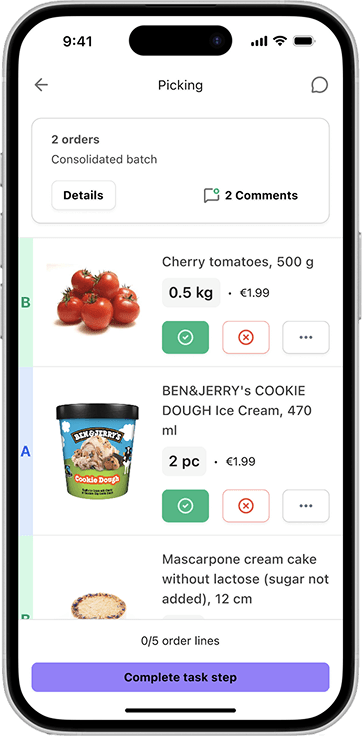
We needed to introduce a clear, high-visibility indicator within an already busy interface—without adding to the visual noise.
Electronic shelf label activation
This required adding a new action to the picking list, despite the screen already being saturated with buttons and information.
Research
I approached the redesign from four angles: understanding the workflow, learning from a real user, reviewing similar tools, and aligning with technical constraints.
Understanding the picking workflow
I started by looking at how picking works in general — the environment, the pace, and the typical challenges. Over time, the screen had grown without a clear structure, so it was important to step back and understand what actually matters during picking and where friction usually appears.
Talking to a real user
I spoke with a picker who uses the current app daily. We went through her workflow, what slows her down, and what works well. This helped clarify which information is critical in the moment and what can stay secondary or out of the way.
Looking at similar tools
I reviewed other picking apps to see how they structure their flows. Pickers often switch between systems, so familiarity matters. The goal was to follow patterns that feel intuitive while still adapting them to our specific needs.
Aligning with development
I worked closely with a developer to understand what changes were realistic without disrupting the flow. The goal wasn’t a big rewrite, but steady improvements — making sure each change was feasible, quick to implement, and didn’t introduce new issues.
Key insights
After reviewing the workflow, talking to a picker, and exploring similar tools, a few clear themes emerged that shaped the direction of the redesign.
What matters
Product photo
The main identifier when picking. It’s the fastest way to recognize the item on the shelf.
Title/Brand
Almost as important as the photo. Helps confirm the item, especially when products look similar.
Price and weight
Used as a secondary check. Important when something doesn’t scan correctly or there’s doubt about the item.
What doesn't
Order ID
Not needed in this context. A different order code is used consistently across the workflow.
Report issue
Used occasionally, but not critical during picking. Issues are rarely resolved in the moment.
Extra metadata
Any additional information beyond the essentials. Takes up space without helping the picking task.
Solution
Layout change
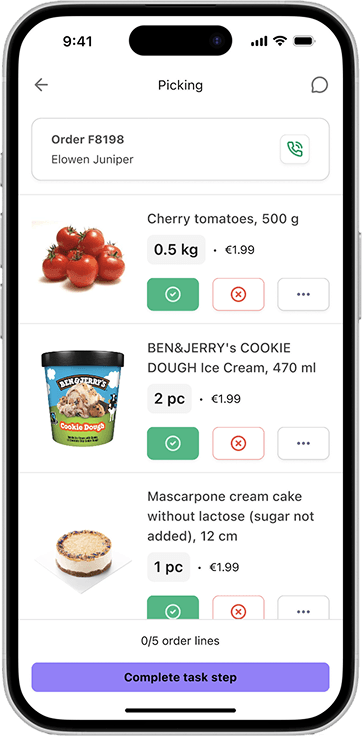
The original layout had grown organically without a clear visual hierarchy. Restructuring it gave each element a defined role and created space for new features to fit naturally.
Before
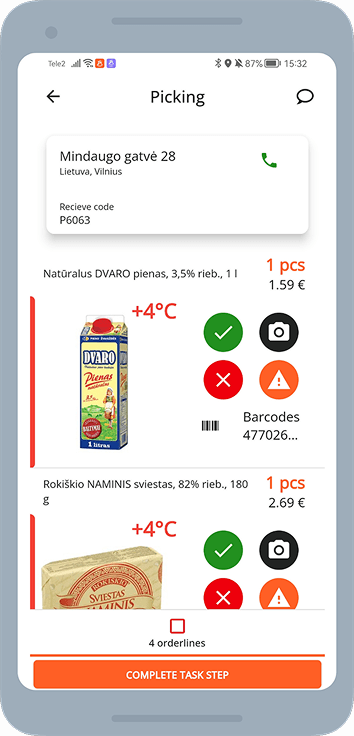
- No clear visual hierarchy between elements
- Action buttons and product info competed for attention
- Limited space for new features
After
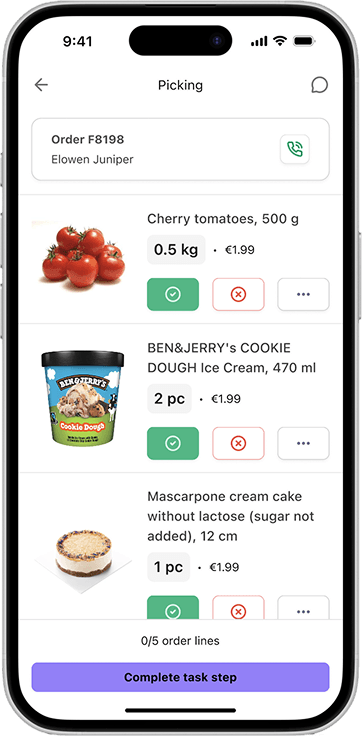
- Structured layout with a clear reading order
- Product info prioritised at the top
- Dedicated zones for actions and metadata
Scalability
Beyond solving the immediate layout issues, the redesign needed to create a structure that could absorb future features without breaking down again.
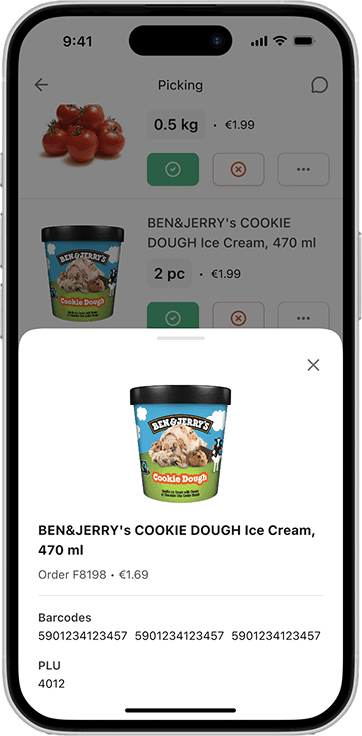
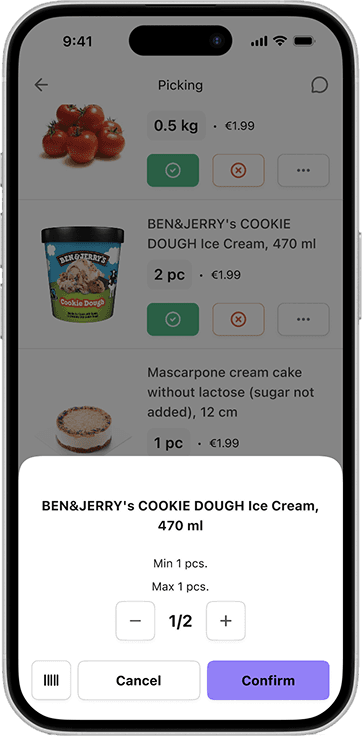
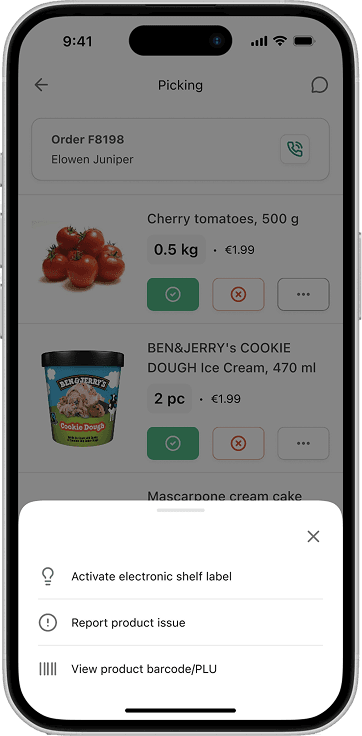
- All secondary actions have been moved to a drawer accessible by clicking the More actions button. Additional features can be easily added later.
- Any secondary metadata can be accessed by clicking on the item photo or through the More actions button, and can be easily explanded without cluttering the main view.
Consolidated orders
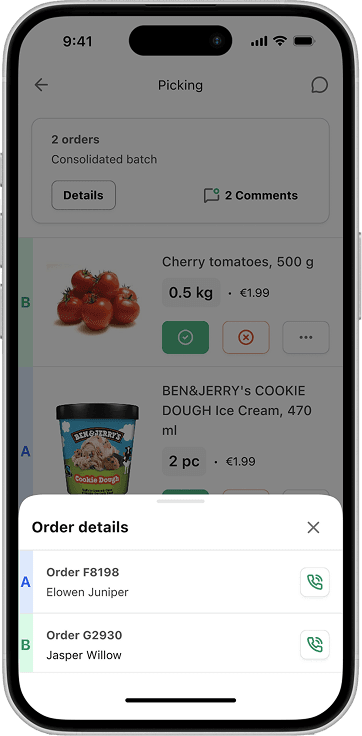
The structural changes to the picking screen made it easy to introduce consolidated orders without adding clutter, while still making it clear which order is which at a glance.
Next steps
This redesign established a clearer structure and more scalable patterns for handling complex workflows.
The next step would be to apply the same approach across other parts of the system—modernizing the UI, improving consistency, and reducing friction in related workflows. This would help move the product toward a more cohesive and maintainable experience overall.